Wednesday, 2 July 2014

XSLT Pgm of Transforming a structure using Tx- XSLT_TOOL / STRANS (ABAP -> XML )


Step1.  we have to select a record from this table and transform it into xml format.


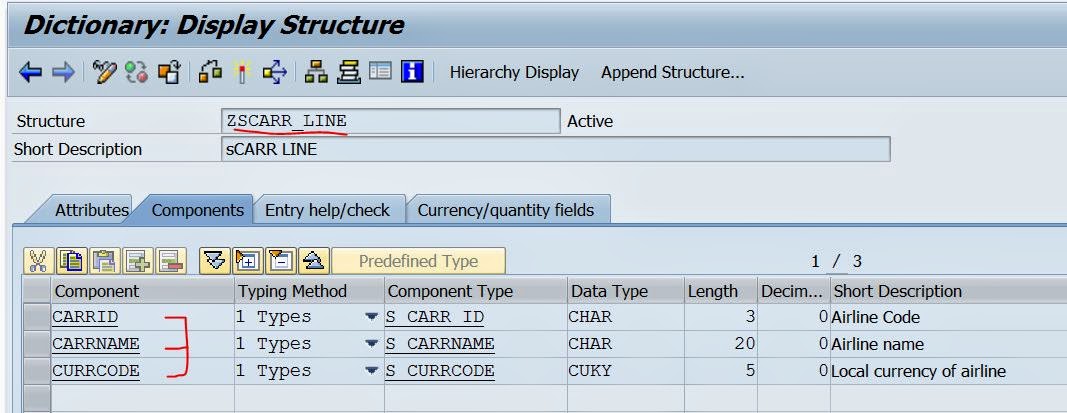
Step2. Create the below structure in Tx- SE11.


Step3. We can create the Transformation Program Either in Tx- SXLT_TOOL/STRANS.


Step4. Provide a Name and click on create button.


Step5. Select the Transformation type and continue.


Step6. Provide the below code and activate the transformation.


Step7. Create the below program & call the above created transformation and pass the values.


Step8. The mapping between the calling program & the Transformation program.


Step9. The O/P is as shown below:


------------------------------------------------------------------xxxxx--------------------------------------------------------

Simple Transformation of Structure Using Tx- XSLT_TOOL / STRANS (XML-> ABAP)

Step1.  Let's assume we need to convert any one record of the table.


Step2. In Tx- SE11 create a structure with the below fields.


Step3.  Go to Tx- SXLT_TOOL.


Step4. Provide a transformation name and create it.


Step5.  Provide short text, select as Simple Transformation and continue.


Step6. Save it and click on SourceCde tab.


Step7. Click on the Wizard button.


Step8. The below screen appears


Step9. Right click on the Root Node and select Insert New Root.


Step10. Provide any root_name and the above created structure name.


Step11. The below screen appears. Now Drag the Node 'FLIGHT_LINE' to the Right side of the screen and drop under Simple Transformation tab.


Step12. After drop the screen looks like below as shown . Activate it and go back


Step13. Go to Tx- SE38 and create a report. Execute the program. By first transformation call the abap data are converted to xml and then this XML data are passed to the second transformation call to get the abap data.


14.  The O/P appears as below


----------------------------------------------------------------xxxxxx----------------------------------------------------------------

Tuesday, 1 July 2014

Simple Transformation of Internal Table Using Tx- XSLT_TOOL / STRANS ( ABAP-> XML)

This post demonstrates how to transform any ABAP structured table data to XML format So that it can be passed to any third party system for further action. Here let's convert a table  records to xml data.

Step-1.  We need to transform this table record into xml structure.


Step-2. Create the below structure with the required fields.


Step-3. Go to Tx- SXLT_TOOL to create a transformation.


Step-4.  Provide a transformation name & click on Create button.


Step-5. Provide a text and choose Simple Transformation and continue.


Step-6. Save it and click on the Tab SourceCde.


Step-7. Click on the wizard(Graphical ) button.


Step-8. Right click on the ROOT and choose Insert New Root from the option.


Step-9. Provide a root name and the structure  & select the check box Line type. Bcoz our intention is to create a table and we are having a structure which will act as a line type. Also we can create a table type by using this structure in Tx-SE11 and use this table type name and no need to select the check box Line-Type.


Step-10. The below screen appears. Here we can see there is a table icon left to the node name. Now drag the Node 'FLIGHT_TABLE' & drop on the right side Under Simple Transformation tab.


Step-11.  The screen appears as shown below. Now activate the transformation and Go Back.


Step-12. The below code generated automatically with our node creation and Drag Drop.


Step-13. Create a program, declare table and fill the record there. Call the above created transformation and pass the table and get the xml table back & display it by FM or abap method.


Step-14. The output looks like as below.


-------------------------------------------------------------xxxxx-------------------------------------------------------------

Comments system

Disqus Shortname