-------------------------------------------------------------------------------------------------------------------------------------
Step1. When a smartfrom is activated it generated a function module that is stored in the DB table. And when this smartfrom is moved to quality or production system and activated it may generate a different function module. So it means that for the same function module there may be different function modules associated with it in different environments. So the driver program should properly get the relevant function module name from the smartform and call it dynamically. For this reason sap standard has provided a FM.
The below is a smarfrom. ZSM_FOUR.
Step2. In the driver program use the FM : SSF_FUNCTION_MODULE_NAME and pass the smartform name and it will give you the function module name. Call this function module dynamically to call the smartform output. Execute it.
Step3. Click on preview.
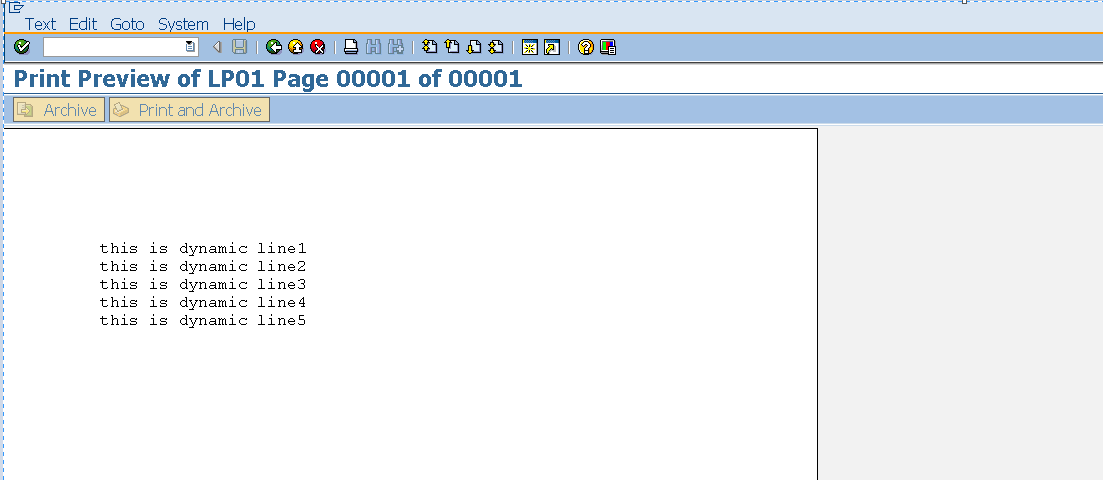
Step4. Here we have the output.
--------------------------------------------------------------------------------------------------------------------------------------
-----------------------------------------------------------------------------------------------------------------------------------
Step1. So here we have a smartform 'ZSM_FOUR' . Every smartform is associated with function module. To call a smartform programatically, it is enough to call the respective function module from the program. From the Environment menu find the smartform function module name.
Step2. Create a program in Tx- SE38 and call the relevant function module of the smartform.
Step3. Activate the program and execute it.
Step4. As the report output, click on the print preview option.
Step5. So we have the smartform output generated by calling the function module of the smartform from the program. But it is not a good way of calling the smartform by calling the function module.
In the development System- Smartform is created and it automatically generates a function module and in the report we call this function module.
When the smartform is moved to a quality or production system, it might generate a different function module and if the same report is used in the quality or production system to call the smartform, sometime it might generate error.
See the next post to know how a smartform is called exactly?
--------------------------------------------------------------------------------------------------------------------------------------
Creating a simple smartform and using dynamic text in the smartform window
-----------------------------------------------------------------------------------------------------------------------------------
Step1. Go to Tx- SMARTFORMS. Create a smartform. Double click on the Global definitions.
Step2. Select Global data tab and declare an internal table of type- TSFTEXT and work area of type TLINE.
Step3. Go to the initialization tab and fill some lines of the declared internal table.
Step4. Now In the MAIN window create a Text and choose Text type as Dynamic Text. In the Field name provide the internal table name with place holders & &. The mentioned internal table data type should be of type TSFTEXT. Activate the smartform and test it.
Step5. Choose Test button.
Step6. Choose Execute button.
Step7. Select Print preview option.
Step8. So here we have the output of the smart form.
-------------------------------------------------------------------------------------------------------------------------------------