Thursday, 26 June 2014

OOABAP Events


Step1. Go to Tx- SE24 and create a Class.


Step2. Provide the details and Save.


Step3. Provide a method name and click on Parameters name.


Step4. Provide an importing parameter and click on the Methods tab.


Step5. Activate the class and  click on Events tab.


Step6. Provide a Event name and other details. Click on Parameters tab.
Step7. Provide the Parameters name for the Events. Events only have exporting parameters.


Step8. Go to the Methods tab. Select the method and click on the Code button or Double click on the method name to provide the code.


Step9. Provide the below code and activate the method.  here the method raises the Event depending on some condition. Then Go Back.


Step10. Go too Tx- SE24 and define another class.


Step11. Provide the details and click on the Save button.


Step12. Under the methods atb, provide a method name and click on the Details tab.


Step13. Here Select  the Event handle for the class and the event. This method 'HANDLE_PEAK_SPEED' is the registered event for the event 'PEAK_SPEED_REACHED' of the class 'ZCL_FOR_RAISE_EVENT'.


Step14. After this the method is marked as Event Handler method. Now Select the method and click on the Parameters tab.


Step15. Here we can maintain the parameter name as importing parameters that are defined as exporting parameters in the event. So when the event is raised it exports the exporting parameters and those are available as importing parameters to the method.


Step16. Double clcik on the method or on the code button to define the method.


Step17. Provide the below code in the method and go back. Activate the class.


Step18. Go to Tx- SE38 and create a report. Instantiate the two class.


Step19. Run the program. The event is triggered only when the entered speed is more than 80.


Step20. This time the event is not triggered.


Step21. Again run the program & provide a speed more than 80.


Step22. The event is triggered and the event handler method is called and executed. So hence we teh the below output.


------------------------------------------------------xxxxxx-------------------------------------------------------------------

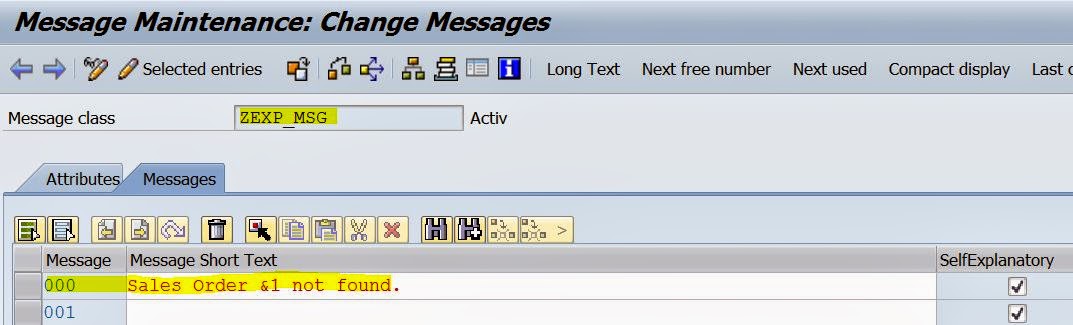
Using Exception Class with Message Class In OOABAP

Step1. Go to Tx- SE91 and Create a message.


Step2. Go to Tx- Se24 and create an Exception class.


Step3. Select the highlighted parts and Click on Save button.


Step4. Activate the class. Go to Attributes section.


Step5. Define as attribute : I_VBELN.Then go to Texts tab.


Step6. Under the Exception ID Provide a name such as 'SALES_ORDER_NOT_FOUND' and then click on the Message Text button.


Step7. Provide the Message class created above, message number and from the attributes section, from the drop down select previously created attribute 'I_VBELN'. That means when this Exception ID is raised it uses the attribute I_VBELN and pass it to the message class number.


Step8. Activate the Exception class.


-------------------------------------------------------------------------------------------------------------------------------
Step9. Create the below program which throws the exception of the above created class.

REPORT  ztest_exception_with_msg.

CLASS lcl_salesord DEFINITION.
  PUBLIC SECTION.
    DATA : vbeln TYPE vbak-vbeln,
                  ls_vbak TYPE vbak.
    METHODS : constructor IMPORTING i_vbeln TYPE vbak-vbeln,
                          get_salesorder RAISING zcx_exception_test,
                          show_salesorder.
ENDCLASS.                    "lcl_salesord DEFINITION

CLASS lcl_salesord IMPLEMENTATION.
  METHOD constructor.
    vbeln = i_vbeln.
  ENDMETHOD.                    "constructor

  METHOD  get_salesorder.
    SELECT SINGLE * FROM vbak INTO ls_vbak WHERE vbeln = vbeln.
    IF sy-subrc <> 0.
      RAISE EXCEPTION TYPE zcx_exception_test
        EXPORTING
          textid = zcx_exception_test=>sales_order_not_found
          i_vbeln  = vbeln.
    ENDIF.
  ENDMETHOD.                    "get_salesorder

  METHOD show_salesorder.
    WRITE :/ ls_vbak-vbeln,
             ls_vbak-erdat,
             ls_vbak-ernam,
             ls_vbak-vbtyp,
             ls_vbak-erdat,
             ls_vbak-vkorg,
             ls_vbak-vtweg,
             ls_vbak-spart.

  ENDMETHOD.                    "show_salesorder
ENDCLASS.                    "lcl_salesord IMPLEMENTATION

START-OF-SELECTION.

  PARAMETERS : p_vbeln TYPE vbak-vbeln.
  DATA : obj_x TYPE REF TO zcx_exception_test.
  DATA: obj1 TYPE REF TO lcl_salesord.
  DATA : result TYPE string.

  CREATE OBJECT obj1
    EXPORTING
      i_vbeln = p_vbeln.
  TRY.
      CALL METHOD obj1->get_salesorder.
      CALL METHOD obj1->show_salesorder.
    CATCH zcx_exception_test INTO obj_x.
      CALL METHOD obj_x->get_text
        RECEIVING
          result = result.
      WRITE :/ result.
  ENDTRY.

------------------------------------------------------------------------------------------------------------------------------
Step10. Execute the program.


Step11. Provide a correct sales order number.


Step12. The program executed without any exception.


Step13. Again run the program and provide an incorrect sales order number.


Step14. The exception is raised and the below message is displayed.


-------------------------------------------------------xxxxx-----------------------------------------------------------------

Wednesday, 25 June 2014

Casting In ABAP Objects

Type of Casting:
1. Narrowing Cast( Upcasting):- When we assign the instance of the Sub class back to the instance of the Super class, than it is called the "Narrow Casting", because we are switching from a "More Specific view of an object" to "less specific view". 


2. Widening Cast(Downcasting):- When we assign the instance of the Super class to the Subclass, than it is called the Widening Cast, because we are moving to the "More Specific View" from the "Less specific view". 


-----------------------------------------------Program----------------------------------------------------------------------------

CLASS lcl_shape DEFINITION.
 PUBLIC SECTION.
              METHODs draw.
 ENDCLASS.

 CLASS lcl_circle DEFINITION INHERITING FROM lcl_shape.
   PUBLIC SECTION.
                 METHODS: draw REDEFINITION,
                                      calc_area.
 ENDCLASS.

 CLASS lcl_shape IMPLEMENTATION.
   METHOD draw.
      WRITE :/ 'Drawing any Shape'.
   ENDMETHOD.
 ENDCLASS.

CLASS lcl_circle IMPLEMENTATION.
METHOD draw.
   WRITE :/ 'Drawing specific shape: Circle'.
ENDMETHOD.

METHOD calc_area.
  WRITE :/ 'Area Of Crcle = 2iiR'.
ENDMETHOD.
ENDCLASS.

START-OF-SELECTION.
data : o_cir type REF TO lcl_circle.
create OBJECT o_cir.
call METHOD o_cir->draw( ). " calls subclass Draw() method
call METHOD o_cir->calc_area( ).
uline.
"--------- Narrow cast(Upcast)---------------"
data : o_shp type REF TO lcl_shape.
o_shp = o_cir. "  Narrow cast(Upcast)
call METHOD o_shp->draw( ). " calls sub class Draw()  method
"call METHOD o_shp->calc_area( ) . " compilation error
uline.

"---------- Widening Cast(Downcast) -----------"

data : o_cir1 type REF TO lcl_circle.

" o_cir1 = o_shp. "  complilation error
o_cir1 ?= o_shp.  " Widening Cast(Downcast)
call METHOD o_cir1->draw( ). " calls subclass Draw() method
call METHOD o_cir1->calc_area( ).

-------------------------------------------------------Output-------------------------------------------------------------------


----------------------------------------------------xxxxx-------------------------------------------------------------------------

Comments system

Disqus Shortname